

Resetting Your Apple ID Password Is Not as Simple as You Think
Most password reset processes are straightforward: enter your email, receive a verification code, set a new password, and you're done in a few minutes. However, the design logic of Apple ID is different; its security architecture emphasizes the binding of devices and identity over merely relying on email verification. This design increases the security of Apple ID but also means that if any linked device or contact method has issues, the recovery process may be significantly more complicated than expected. Understanding this logic is the first step toward solving the problem.
Common Obstacles in the Recovery Process
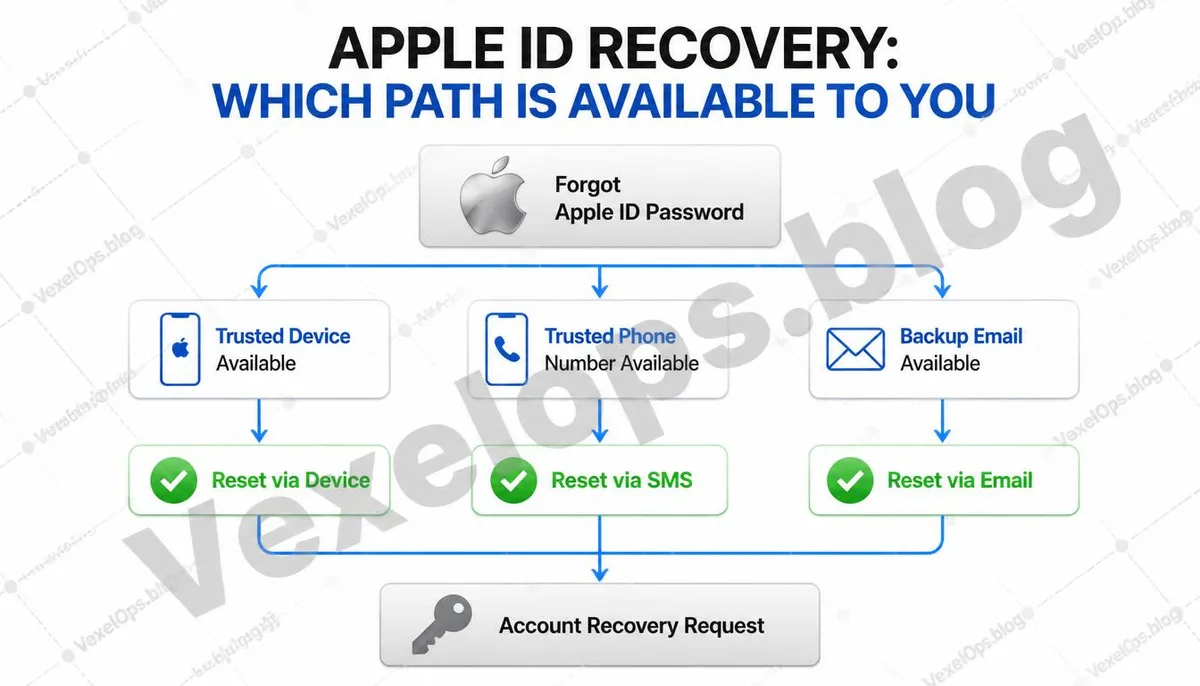
Trusted Device Not Available Apple ID's two-factor authentication sends verification codes through trusted devices that are logged in. If your phone is lost, under repair, or if your old phone has been reset during a device upgrade, the verification channel is interrupted. Many realize at this point that their ability to recover their Apple ID entirely depends on that one device. Phone Number Changed After changing your phone number, if you do not promptly update the trusted phone number in your Apple ID, the verification code will go to a number where you can no longer receive texts. This is especially easy to happen when upgrading and changing numbers simultaneously since the step of updating account settings can easily be overlooked. Inaccessible Recovery Email Some Apple IDs use recovery emails that are several years old, which may have not been used for a long time or may have been deactivated by the service provider due to inactivity. When attempting to recover through the backup email, it may turn out that the email itself also needs resetting. Account Security Lock Entering an incorrect password or verification code multiple times triggers Apple's
What Is an Account Recovery Key?
Apple offers a feature called an account recovery key, which is a 28-character string used in scenarios where standard recovery methods are unavailable. Once activated, Apple will cease to provide other recovery assistance, and the recovery key becomes the sole basis for account recovery. This design ensures a very high level of account security, but it also means that if the recovery key is lost and all other verification methods fail, Apple cannot assist in recovering the account. The recovery key is suitable for users with a high demand for account security, but it must be ensured that the key is securely stored.
If You Still Have Some Access, Prioritize These Tasks
If you can still log into any trusted device or if any verification methods are still available, your top priority should be to log into your Apple ID settings and update all contact information to reflect the devices and numbers you are currently using. Items to confirm: - Is your trusted phone number the one you are currently using? - Can you still log into your backup email? - Is the list of devices logged into your Apple ID accurate? - Is your account recovery key enabled, and if so, is it stored securely? This confirmation process only takes a few minutes but can greatly reduce the difficulties faced during future device upgrades or loss.
Options When All Channels Are Unusable
When trusted devices, trusted phone numbers, and backup email are all unavailable, Apple provides an application process for account recovery. This process requires verifying account ownership, including providing purchase history of devices, past passwords, and any other information that can prove the account is yours. This process usually takes days to weeks, as Apple's security team conducts a manual review. The more complete the materials prepared during this process, the higher the likelihood of approval. If you're unsure which items are most helpful while gathering this information or need assistance determining the most feasible recovery path, VexelOps can offer specific guidance to make the process more organized.
Common Questions about Apple ID Password Recovery
How Long Does It Typically Take to Process an Apple ID Recovery Request?
The waiting time varies by situation and does not have a fixed timeline. Apple's manual review process typically takes a few days, and in some cases, it may take longer. After submitting your request, Apple will notify you of the review progress via your backup contact method. During the wait, any devices linked to this Apple ID will not be able to use iCloud services, which is why maintaining account settings ahead of time is much more time-efficient than trying to recover after the fact.
What Should I Do If I Forgot My Apple ID's Email Address?
If you forget the email address linked to your account, you can try checking in the settings page on your iPhone or iPad, where the currently logged-in Apple ID email is usually displayed at the top. If you cannot access the device, you can visit Apple's official iforgot.apple.com page to try using your trusted phone number to retrieve it.
Is My Apple ID the Same as My iCloud Account?
Yes. An Apple ID is used to log into all Apple services, including iCloud, the App Store, iTunes, Apple Music, and iMessage, using the same account credentials. Recovering the password for your Apple ID also restores access to all these services, which is why the security settings of the Apple ID significantly impact the overall Apple experience.
##One Key Takeaway:## The difficulties in recovering an Apple ID are often not technical issues, but rather discovering at the moment of recovery that the contact information that should have been kept updated is already outdated. Taking a few minutes regularly to check whether trusted devices and trusted phone numbers are still valid is the most direct way to prevent such dilemmas.