
Your LinkedIn Profile May Be the Most Comprehensive Public Document About You Online
Most people approach creating their LinkedIn profile with the mindset of being as visible as possible, detailing their work experience, adding as many skills as they can, and providing complete contact information. This logic is reasonable in the context of job searching and networking, but it also makes LinkedIn a publicly accessible database of personal data. Details such as company names, job titles, years of experience, direct supervisors, and team members combine to provide valuable starting points for those looking to launch social engineering attacks against you or your company. Phishing attackers can use your LinkedIn information to craft highly customized scam emails containing real job details, making them appear as though they are from people you know or organizations you trust.
The Most Common Risks on LinkedIn
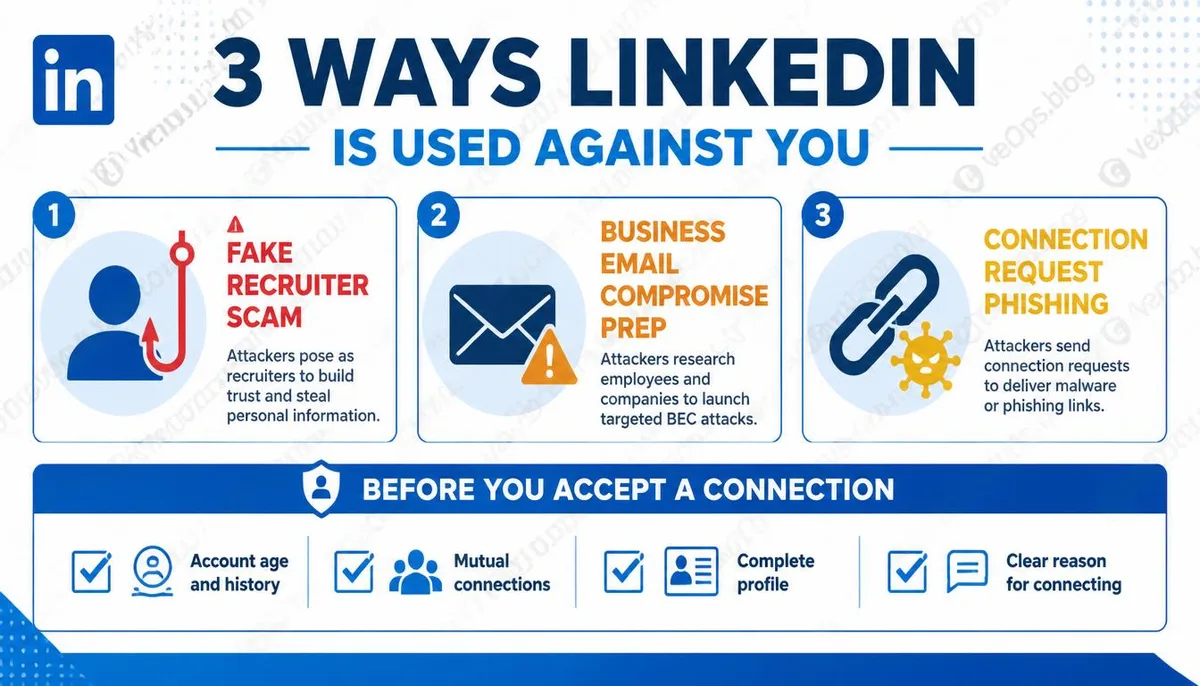
Fake Recruitment Scams Fake recruitment scams are one of the most frequently occurring types of scams on LinkedIn. Scammers create professional-looking fake recruiter accounts, actively contacting targets with high salary, flexible work opportunity offers, asking them to click external links to fill out application forms or download so-called job description documents. These links and attachments could contain malware or direct to phishing sites to steal account information. Real recruitment processes rarely ask you to provide personal information on unknown platforms outside of LinkedIn, nor do they request you to download files immediately after initial contact. Preparation for Business Email Scams LinkedIn's company organizational charts provide attackers with free intelligence. They can use public profiles to identify a company's financial officers, direct supervisor relationships, and employee work email formats. This information is used in business email scams where attackers impersonate company executives, sending instructions to financial personnel for urgent fund transfers. Phishing Links in Connection Requests and Direct Messages It is very common on
Several Options Worth Adjusting in Account Settings
LinkedIn's default settings are quite open regarding data visibility, and the following settings should be actively verified: Visibility of Profile Information LinkedIn allows you to set the visibility of different fields individually, from everyone, connections only, to only yourself. You can adjust each field separately. Information like phone numbers and personal email addresses does not need to be visible to everyone; limiting visibility can reduce the risk of mass data collection. Settings for Profile Appearance in Search Engines By default, LinkedIn allows search engines to index your public profile, meaning your LinkedIn page can appear directly in Google search results. If you do not want your profile to be indexed by search engines, you can disable this option in your privacy settings. Activity Status Visibility LinkedIn defaults to showing your online status, letting other users know you're currently active. Disabling this option allows you to browse content without specific individuals noticing your activity patterns. Source Tracking of Connection Requests LinkedIn provides a feature that shows how others found your profile and sent connection
When Receiving Messages from Unknown Recruiters, Here Are Some Starting Points for Assessing Authenticity
Not all unsolicited recruitment messages are scams; LinkedIn is indeed a platform where numerous legitimate recruitment activities take place. The key to judgment is not to reject all unfamiliar contacts but to confirm a few basic credibility indicators before further interaction. Consider whether the account was created recently, if the number of connections is suspiciously low, or if the profile lacks specific details; these are all initial indicators to assess. Authentic recruiters typically have complete work histories, a reasonable number of connections, and interaction records on the platform. If they quickly request you to follow external links, fill out personal information, or download files following initial contact, this request itself warrants careful verification. If you discover anomalies during the verification process, or if you have already clicked suspicious links, VexelOps can assist in assessing your current risk status and prioritize which account safety verifications need to be addressed.
Common User Questions Regarding LinkedIn Security and Personal Data Protection
Can I Prevent People from Taking Screenshots or Collecting My LinkedIn Information?
It is impossible to block this directly. As long as your profile is set to public, anyone logged into LinkedIn can view and record this information; the platform itself has no mechanism to prevent manual screenshots or recording. What you can do is actively decide which information is worth sharing publicly and which should be restricted in visibility. Information such as phone numbers, personal email addresses, and precise locations does not need to be visible to everyone on LinkedIn. Work experience and skills, which are core aspects of LinkedIn, should not be hidden entirely as it diminishes the platform's value to you. Striking this balance is more practical than attempting to completely stop the flow of information.
What Risks Are There When Accepting Connection Requests from Strangers?
Accepting connection requests will not give the other party access to your account permissions, but it will allow them to see all profile content that you set to be visible to connections, as well as contact you directly via messages. Certain information, such as email addresses, may only be visible after a connection is established. If they send a private message with links immediately after connecting, this behavior pattern is a clear signal; it is advisable not to click any links and to consider removing the connection. For completely unfamiliar requests with incomplete account information, without shared contacts or clear reasons for contact, it may be best to choose not to accept.
How Are Job Scams on LinkedIn Different from General Job Scams?
Fake recruitment scams on LinkedIn are harder to identify than general job scams due to the credibility aura surrounding the LinkedIn platform itself. People tend to lower their guard when receiving messages on LinkedIn compared to unknown emails because of the association with the workplace and professionalism, which makes it seem safer. Scammers exploit this cognitive dissonance, leading to higher success rates when attacking via LinkedIn compared to other channels. Specific identification methods include verifying the account's history, requesting video confirmation of identity, refusing to fill out personal information on unknown pages outside of the LinkedIn platform, and being highly alert to any requests for fees during the interview process.
One Key Takeaway: Your LinkedIn profile is a public document that you actively create, allowing you to be seen and giving interested parties the opportunity to gather detailed information about you. Regularly checking the visibility settings of each section and maintaining a basic habit of confirming connection requests and recruitment messages is the most direct way to protect yourself on this platform.